
Code reading: DataMatrix and barcodes
OPADMX reads DataMatrix codes and OPABAR reads barcodes (Code 128, Code 39, EAN, ITF…). The settings window rereads the area at each change and shows what the tool saw, module by module.
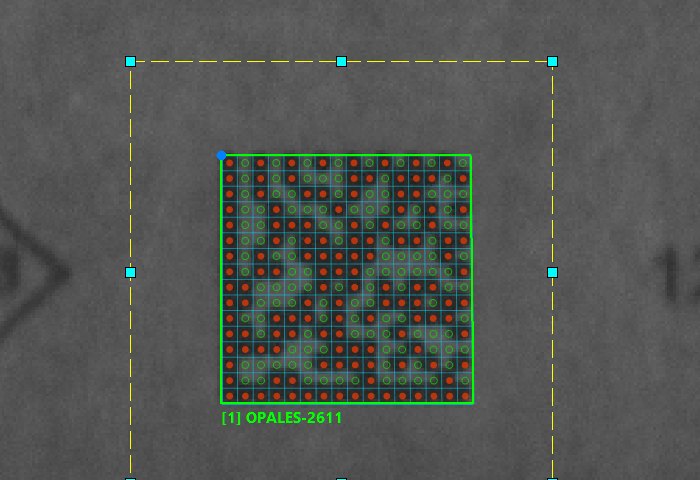
Reading and checking
The reading area (yellow dashes) is set with the mouse. The code read is surrounded in green with its text. For a DataMatrix, the theoretical module grid is drawn transparently and each module is marked as it was read, before error correction: red disc = black, green ring = white.
The report gives the text, the centre, the angle, the symbol size (here 16 × 16 modules of 5.6 pixels), the contrast and the method that read it.
The settings
Formats read (checkboxes), magnification F and smoothing I for small codes or dot-peen marks, dot joining N, number of expected codes J, module size M (speeds up reading a large code), DataMatrix size O.
For a blurred inkjet print, grid reconstruction rereads the symbol when normal reading fails. The “Chercher un réglage qui lit” (find a setting that reads) button tries the magnification × smoothing combinations, from the lightest to the heaviest, and shows the margin of each setting.
Good to know
- Results: number of codes, centre and angle, text in a global string, contrast, format; for a DataMatrix, the box, the grid and the modules as objects, which DRWO can draw.
- Only the modified parameters are written back to the line: a formula that was not touched stays intact.
- Instruction help:
OPABAR,OPADMX.
