
Colour extraction
COLCEX finds the pixels of a colour in the red, green and blue planes of the image: colours trained on a drawn area, or a hue deviation measured against the background of the part (rust, yellowing), combined in groups.
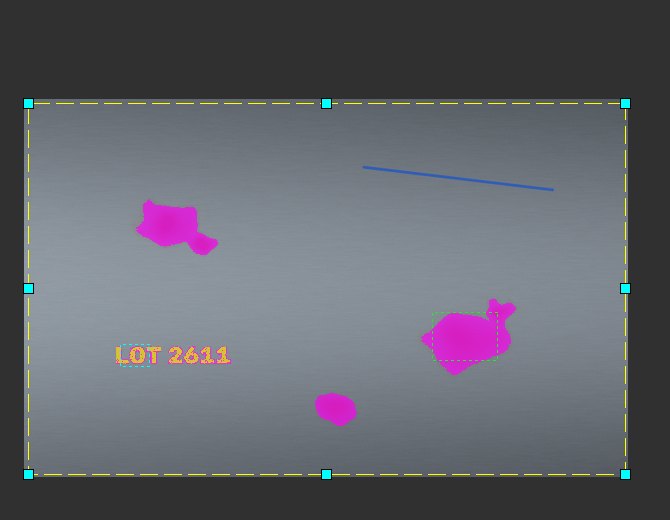
A metal sheet to inspect
Sample image: a grey metal sheet with rust spots and a yellow “LOT 2611” marking that must not be counted. The run area (yellow dashes) is set with the mouse; a blue or red line drawn on the image notes an example of a defect or a sound area for the search for the best setting.
A hue deviation, without training
“Rougissement” (reddening) type, then an area drawn on a spot: the tool chooses the sensitivity based on this spot. It compares each pixel with the background of the area, in terms of spread: it depends neither on the lighting nor on the exact hue of the sheet. The pixels found are shown in magenta.
The yellow text also stands out: it is redder than the grey background.
Training a colour… and subtracting it
“Couleur” (colour) type, then an area drawn on the yellow: the trained colour is the set of RGB values seen in the area. Added as it is, an area that is too wide also takes in the sheet (here 27% of the area).
With the “Retrancher” (subtract) action, the same colour erases from the group what it recognises: only the rust remains.
How the tool extracts colours
The “i” badge at the top right describes the steps: training, cleaning and extensions (matte line, highlight line), dilation and softness, hue deviation, groups, run. Each setting also has its small badge with two drawings, low value and high value.
Good to know
- Several training images can be kept in the tool, with their “to find” and “not to find” examples.
- “Chercher le meilleur réglage” (find the best setting) tries the criterion's settings on all these images and ranks the results.
- Results: pixels found, percentage of the area, pixels of each group; grey image of the result in a plane.
- Instruction help:
COLCEX.
